Wrightforge

Internet of Things · Field Notes

I started by connecting things.
I stayed for the systems.

Across twelve hands-on lessons, an ESP32-S3 has grown from a single button into a private Wi-Fi workshop event station. It now takes photographs with temperature, humidity, and distance context—by request or on an opted-in object arrival. Private cloud access and wireless updates extend the build; GPT DOTS agent Sage now connects a spoken request to a fresh image, sensor context, and a description.

01
Signals
02
Systems
03
Operations
04
Action
05
Intelligence

Current milestone · Extended through October 3, 2026

A workshop moment. Captured with context.

Camera, temperature, humidity, and ultrasonic distance now share one private event record. The prototype works over Wi-Fi, with manual capture tested on both Mac USB and an external USB battery pack. Signed-in cloud capture and Sage-assisted interpretation now extend that same event path.

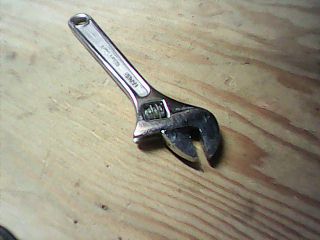
Actual ESP32-S3 camera photograph of an adjustable wrench on a wooden workshop bench
Actual device capture · 320 × 240 pixelsA wrench, not a mock-up.

A dashboard-requested photograph from the camera-and-environment stage: 17.5 °C and 65.2% relative humidity, with the sensor sample 1.77 seconds old. This earlier manual image predates distance metadata and automatic capture.

What now works

From a button press to an object arrival.

  • Take a photo from the dashboard with a mouse or keyboard, or use the onboard BOOT button.
  • Attach environmental readings and distance at capture; show live distance separately.
  • Enable proximity capture deliberately: arm above 80 cm, then arrival at or below 80 cm within the valid 2–200 cm range.
  • Keep the full archive on the private Mac receiver; sync the latest event to the signed-in cloud dashboard.

Automatic mode defaults off. Its rule requires clear/re-entry for another photo; invalid readings do not count as clear. Sessions expire, and a firmware restart returns automatic mode to off. This is ultrasonic proximity—not PIR motion detection or a safety system.
6
accepted photos · September 20
5
proximity-triggered photos
0
rejected captures in that session
36
checks at September 20 closeout

The September 20 closeout event paired 36.99 cm with 21.5 °C and 59.0% RH. Further hands-on tests worked, and automatic capture was switched off at closeout. Formal hold/re-entry and integrated failure tests, farther-range accuracy, and physical acceptance of the later 80 cm rule remain open. Agent-assisted image interpretation has since been demonstrated. The dashboard shows the latest accepted photo, not a live video stream.

GPT DOTS · Agent Sage · Verified October 3, 2026

Ask about the workshop. Answer from an observation.

A natural-language request now connects the camera, environmental context, private cloud dashboard, and Sage’s visual interpretation. The agent checks the accepted event rather than assuming that an old dashboard image is a new observation.

A completed activity

“Take a workshop photo, check temperature and humidity, and tell me what you see.”

  • Sage requests one photograph through the connected dashboard.
  • The ESP32 sends the image and sensor context to the Mac receiver.
  • The outbound bridge synchronizes the accepted event to the private cloud dashboard.
  • Sage verifies the new timestamp, inspects the image, and returns the readings and a grounded description.

What the answer means

A snapshot with a known age.

  • Temperature and humidity describe the sensor sample attached to that photograph, not continuous cloud telemetry.
  • The image is a 320 × 240 snapshot. Small labels and fine details can be uncertain.
  • The Mac must be awake with its receiver and bridge running; the camera needs power and Wi-Fi.
  • This demonstrated workflow uses Sage and the existing dashboard; it is not a dedicated telemetry API or unattended monitoring service.

A requested observation permits one capture. It does not enable automatic photos or authorize physical movement. The private workshop image and access credentials are not published here.

The physical loop

From observation to controlled motion.

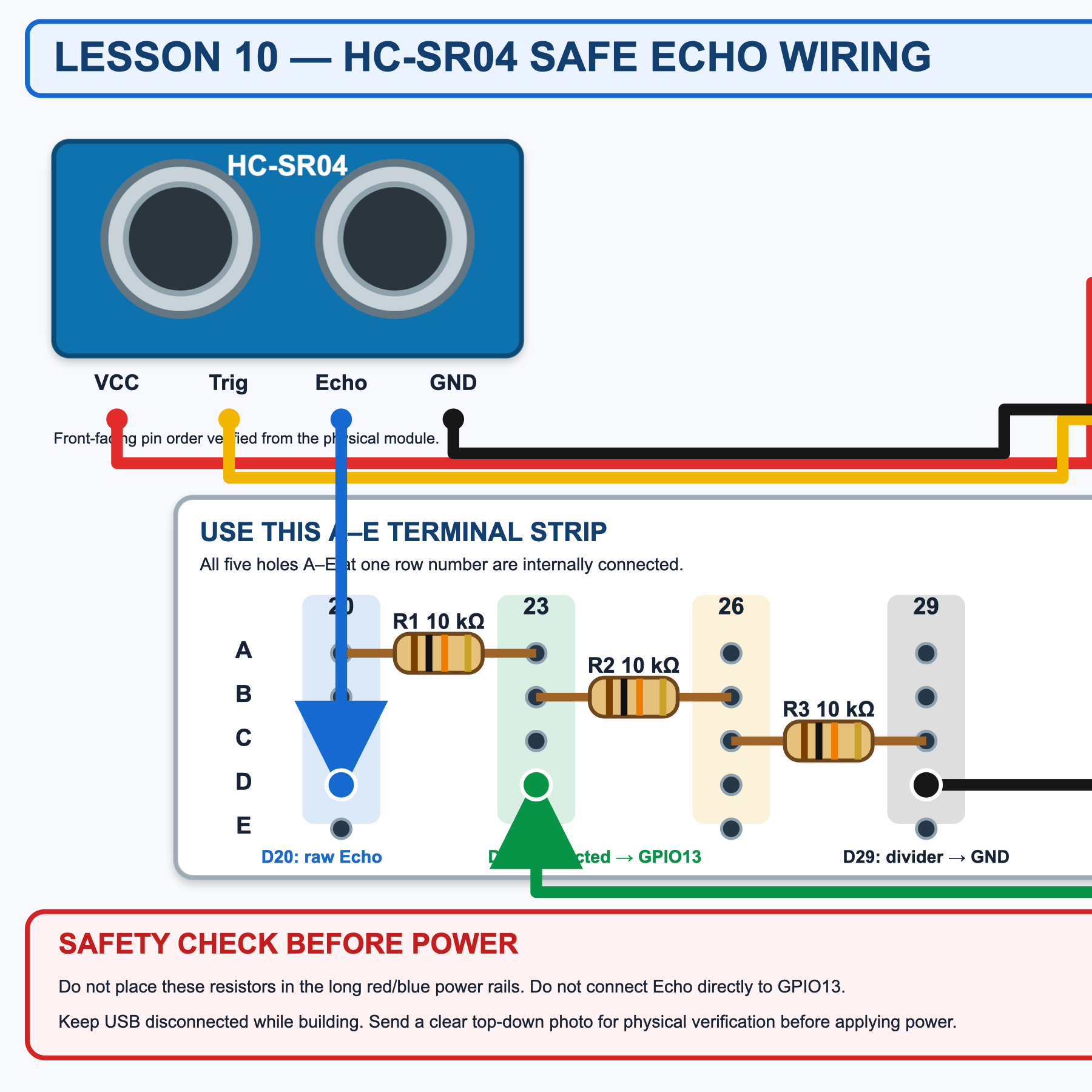
Lesson 09 proved bounded servo movement. Lesson 10 then introduced ultrasonic perception through a 3.3 V-safe Echo path, without allowing an unverified sensor to command the actuator.

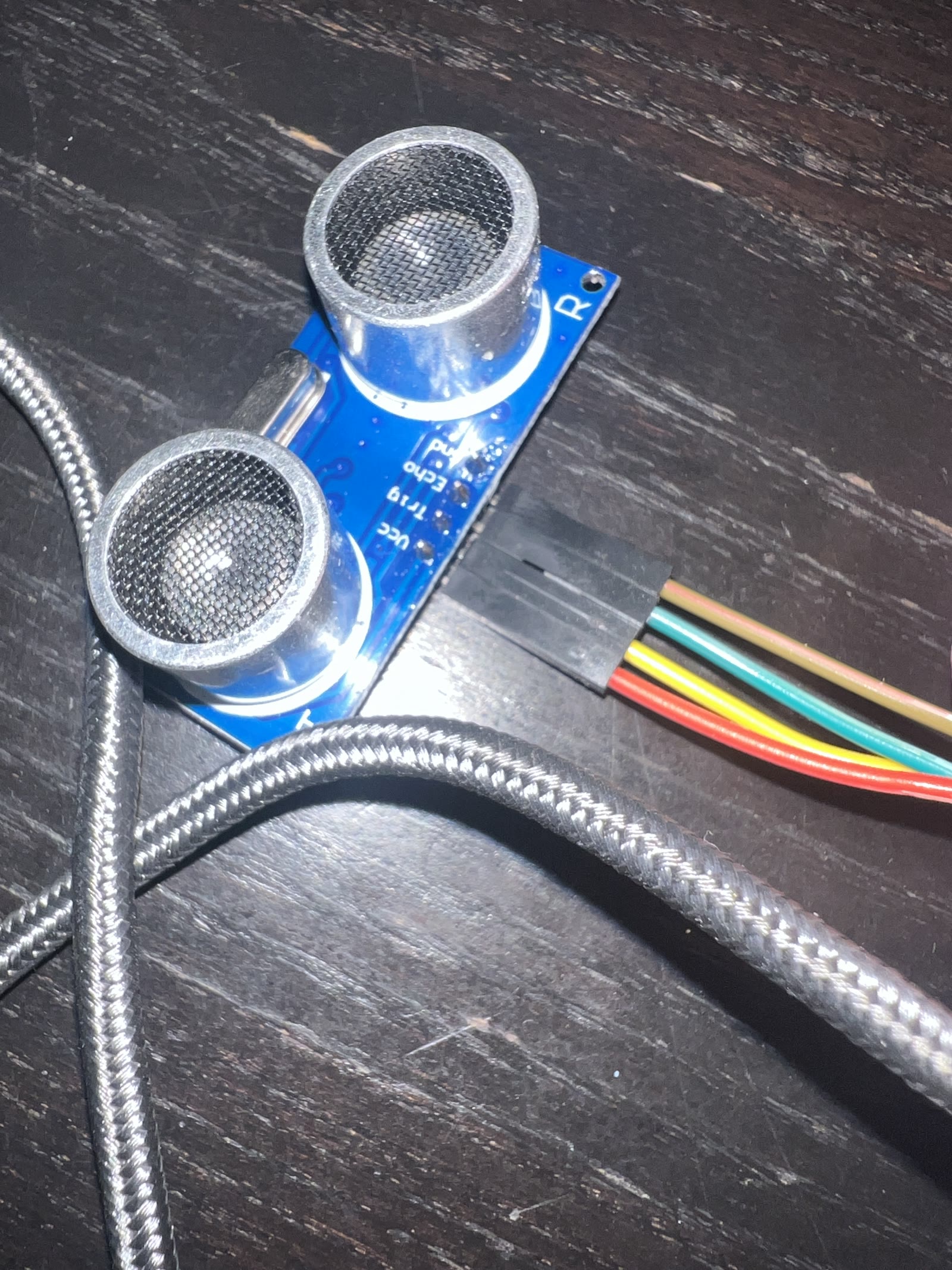
HC-SR04 ultrasonic sensor connected to the ESP32-S3 breadboard during physical distance testing
Perception layerHC-SR04 distance node under test

The earlier Lesson 10 build produced valid measurements at 30, 50, and 78 cm, each within ±0.1 cm of the ruler reference. This is a historical test result, not an accuracy claim for the later camera integration.

Checked wiring diagram showing the HC-SR04 Echo voltage divider and protected ESP32-S3 GPIO13 connection
Safety boundaryFive volts in. Protected signal out.

Historical Lesson 10 wiring: a 10 kΩ / 20 kΩ divider protects the Echo input. Lesson 12 retains the divider but uses Trig GPIO1 and protected Echo GPIO14 to avoid camera-pin conflicts. Direct Echo-to-GPIO wiring is prohibited.

09
servo baseline complete
20–160°
bounded movement
30 / 50 / 78
centimetre tests
±0.1 cm
observed agreement

The shape of the work

One signal. A whole system behind it.

The device is the visible part. The real craft is the path from a physical event to a decision someone can trust.

  1. 01Sense
  2. 02Connect
  3. 03Store
  4. 04Interpret
  5. 05Act

The first working field node

From breadboard to browser.

Built and verified across Lessons 01–08, August–September 2026. The images below are from the working lab, not a product mock-up.

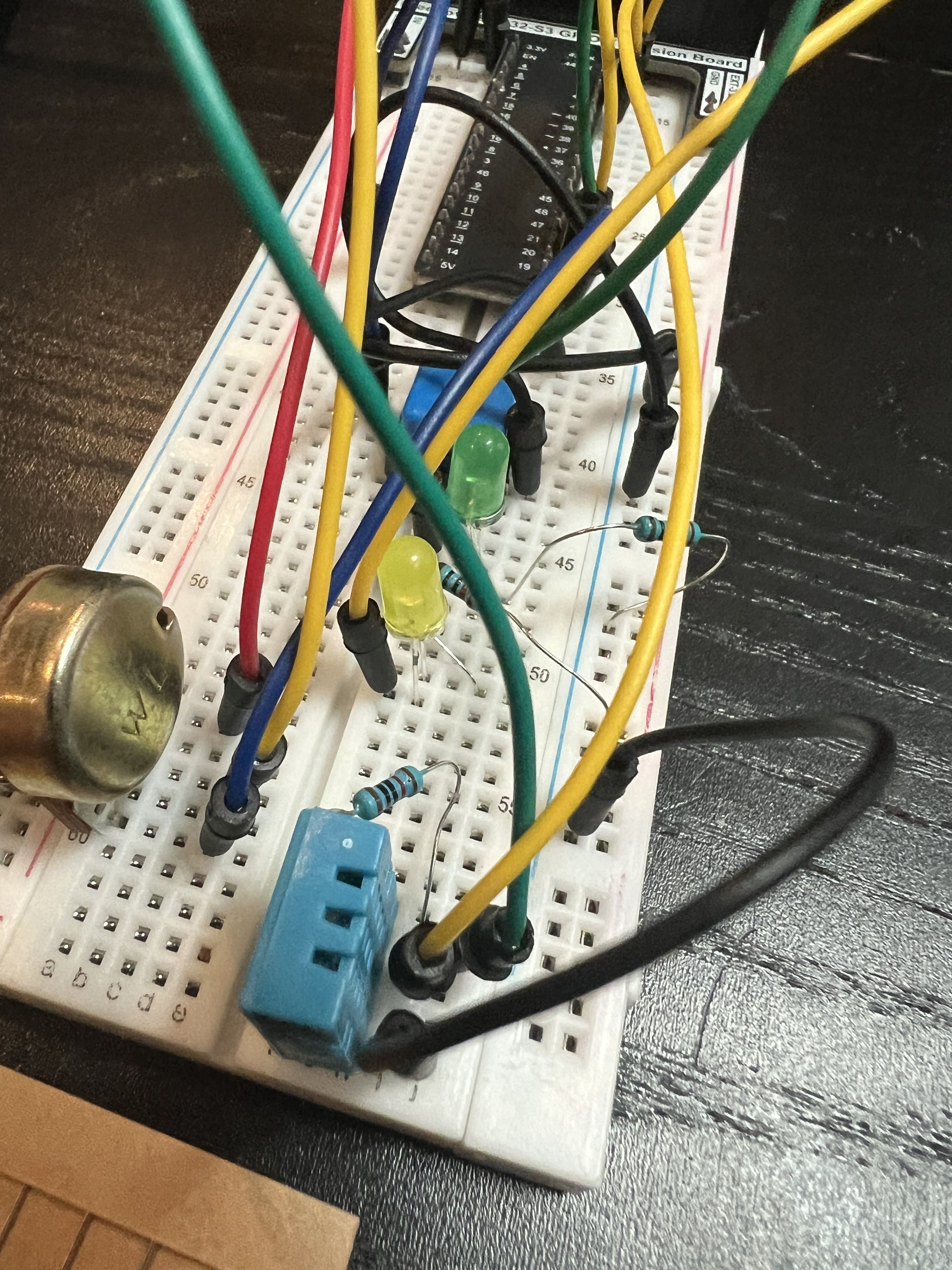
ESP32-S3 environmental monitor on a breadboard with a blue DHT11 sensor, LEDs, resistors, potentiometer, and jumper wires
Physical layerESP32-S3 environmental node

DHT11 sensing, visible status LEDs, and the earlier control experiments preserved on the breadboard.

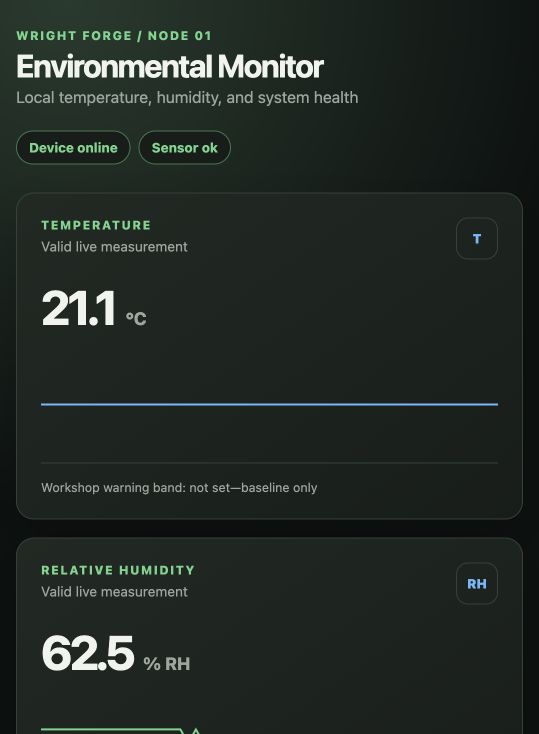
Wright Forge Environmental Monitor showing the device online, the sensor healthy, 21.1 degrees Celsius, and 62.5 percent relative humidity
Operational layerLive monitor, captured in the lab

The same reading becomes a usable interface with health, recency, and fault context.

08
lessons completed
02 s
reading interval
12
automated checks
Private
remote access

The journey

Ten chapters, one connected thread.

One connected thread now runs from first voltage readings to private monitoring, bounded motion, cloud access, and agent-assisted image interpretation. Each chapter below records evidence from the build.

Observe

A physical signal becomes trustworthy data

The lab began with an ESP32-S3, a button, a potentiometer, and LEDs. Those early circuits made voltage, digital state, analog readings, and PWM visible. A DHT11 then moved the work into a real condition: measuring temperature and humidity in the room.

A reading becomes useful when its source, range, and meaning can be explained.

Connect

The data path becomes the experiment

Readings first crossed USB as versioned, validated JSON. The same schema then travelled over local Wi-Fi using HTTP, without changing the data model. Separating power from transport made the node portable while keeping one continuous record on the Mac.

Power, transport, and data are separate systems—and each needs its own proof.

Operate

A dashboard makes failure legible

The environmental monitor now shows live temperature and humidity alongside device and sensor health. Deliberate fault injection proved that the page can distinguish a missing device from a bad sensor, preserve the last known reading, and show recovery when the data resumes.

A trustworthy monitor explains what failed, not just that the numbers stopped.

Interpret

Private remote access comes before AI

The monitor is available on an iPhone over cellular through a private Meshnet connection—without opening a router port or publishing the dashboard to the public internet. Remote access remains useful because sensor, device, and transport states keep their separate meanings.

Secure access and clear rules earn the right to add intelligence later.

Act

Perception and motion earn trust separately

A potentiometer first commanded an unloaded servo through conservative 20–160 degree limits and a rate-limited sweep. The servo was then disconnected while an HC-SR04 distance sensor, protected by a 10 kΩ / 20 kΩ Echo divider, was measured independently. Only verified inputs will be allowed to command physical movement.

Prove perception and actuation independently before closing the loop.

Monitor

Distance becomes a wireless advisory system

Lesson 11 carried the proven distance signal over Wi-Fi to a private dashboard. Clear, approaching, close, and stop zones made the reading useful; invalid or disconnected data became UNKNOWN instead of a reassuring but stale number. Independent USB power made the sensor portable, while the servo remained disconnected.

A missing observation is unknown—not clear, safe, or zero.

Capture

A photograph becomes a contextual event

Lesson 12 combined the ESP32-S3 camera with the existing Wi-Fi path, DHT11, and protected distance sensor. Camera-pin conflicts were resolved before integration. A dashboard shutter removed the need to touch the board; opt-in proximity rules then added automatic arrival photographs. The lesson closed on September 20 with a working prototype and explicit remaining tests.

Capture the context as well as the image—and distinguish a working prototype from a fully validated system.

Reach

A private cloud bridge reaches the workshop

The workshop station gained a Cloudflare-hosted dashboard behind sign-in. An outbound Mac bridge synchronizes the latest accepted image and its sensor context, and carries deliberate capture requests back to the local receiver. Phone capture and cloud sync were verified with phone Wi-Fi disabled and the ESP32 on external power.

Device health, receiver health, and bridge health are separate checkpoints.

Maintain

Wider arrival rules and wireless firmware updates

The arrival rule now arms on a valid reading above 80 cm and captures after three samples spanning at least 500 ms at or below 80 cm. Holding a target does not produce repeated photos; it must leave the hold area before re-entry. Password-protected wireless firmware updates were installed and verified on home Wi-Fi, with USB retained as the recovery path.

An updated rule must agree in firmware, receiver validation, and dashboard instructions.

Reason

GPT DOTS: Sage connects a request to real evidence

On October 3, a request to Sage through GPT DOTS completed a real workshop check: request one fresh photograph, confirm its timestamp, read the temperature and humidity attached to that image, inspect it, and describe the visible contents. This is an agent-assisted workflow through the existing connected dashboard—not an AI model running on the ESP32.

Ground the answer in a dated observation, and keep capture permission separate from interpretation.

What the field teaches

The technology changes. The lessons hold.

Failure states are data

A stopped timestamp, an offline device, and a sensor fault tell different stories. Naming each state makes troubleshooting faster.

Continuity beats transport

USB and Wi-Fi can carry the same schema. One data model preserves the story even when the connection method changes.

Private by default

Remote access does not require exposing the home network. Meshnet and a signed-in cloud bridge provide different private access paths; household images and credentials stay out of the public field notes.

Prove before combining

The camera, environmental sensor, and ultrasonic sensor were proved in stages. Shared GPIO pins forced a wiring change; a successful component test did not guarantee a successful integration.

From connected to intelligent

Rules before reasoning. The loop is taking shape.

Sage has now described a deliberately requested workshop image with its photo-time environmental context. The next experiment is repeatable evaluation: compare descriptions with known scenes, measure uncertainty, and test recovery when a sensor or bridge becomes unavailable. Autonomous monitoring and local AI inference remain future work. Capture permission stays explicit and rule-based; the servo remains disconnected.

Explore the wider work

Contact

Got a problem worth forging on?

I’m always up for talking shop — AI, contact centres, or whatever you’re building.